
 CNC SOFTWARE · AUTOMATION · TRAINING
MacroMill CNC Lathe SimulatorCNC lathe simulator with full G-code and advanced macro programming
A full G-code and advanced macro logic executor, with 180+ tools, tool probing and robot automation, in one 3D lathe. A Windows 10/11 desktop application for learning, testing and proving CNC lathe programs before they reach a real machine.
Secure checkout on Payhip · Refund Policy

See the Simulator in Action
Run real FANUC macros, program a 7-axis robot arm, set up tools, chuck and stock, all in 3D on your Windows PC.



3D machining simulation with live controller readouts.
See exactly what your program does to the part while following the same information an operator reads on the control. Most simulators only play back basic G-code. MacroMill runs your programs the way a real control does.
- 3D material removal: watch the stock being turned, pass by pass, as the program runs.
- Live controller screen: X/Z position, distance to go, feed, current line, cycle time and part count update as you run.
- Understand every block: link each line of code to the movement it creates.
The whole lathe workflow, from program to production cell.
Write a parametric program once, change the variables and watch the new part being cut. Then check the setup, the tooling and the automated cycle in the same environment.
Full G-code execution
Complete lathe programs, including G70–G73 roughing and finishing and G76 threading.
Advanced macro logic
Variables, calculations, conditional logic, loops and macro calls (G65), with Fanuc-style # variables.
Built-in advanced macros and probing macros
Ready to run, including the buttress thread macro and tool probing routines.
More than 180 tools
Real holders and inserts on a 3D turret, with a tool library to set up and select tools for your turning operations.
Live 3D machining
Real material removal pass by pass, with a live controller screen showing X/Z, distance to go, feed, current line, cycle time and part count.
Tool probe
Measure tools and set offsets with the correct probing workflow, and practise the routine setup steps done before pressing cycle start.
Stock and pressure analysis
See where cutting and clamping load the part, including chuck pressure, as part of planning a safe setup.
Robot automation
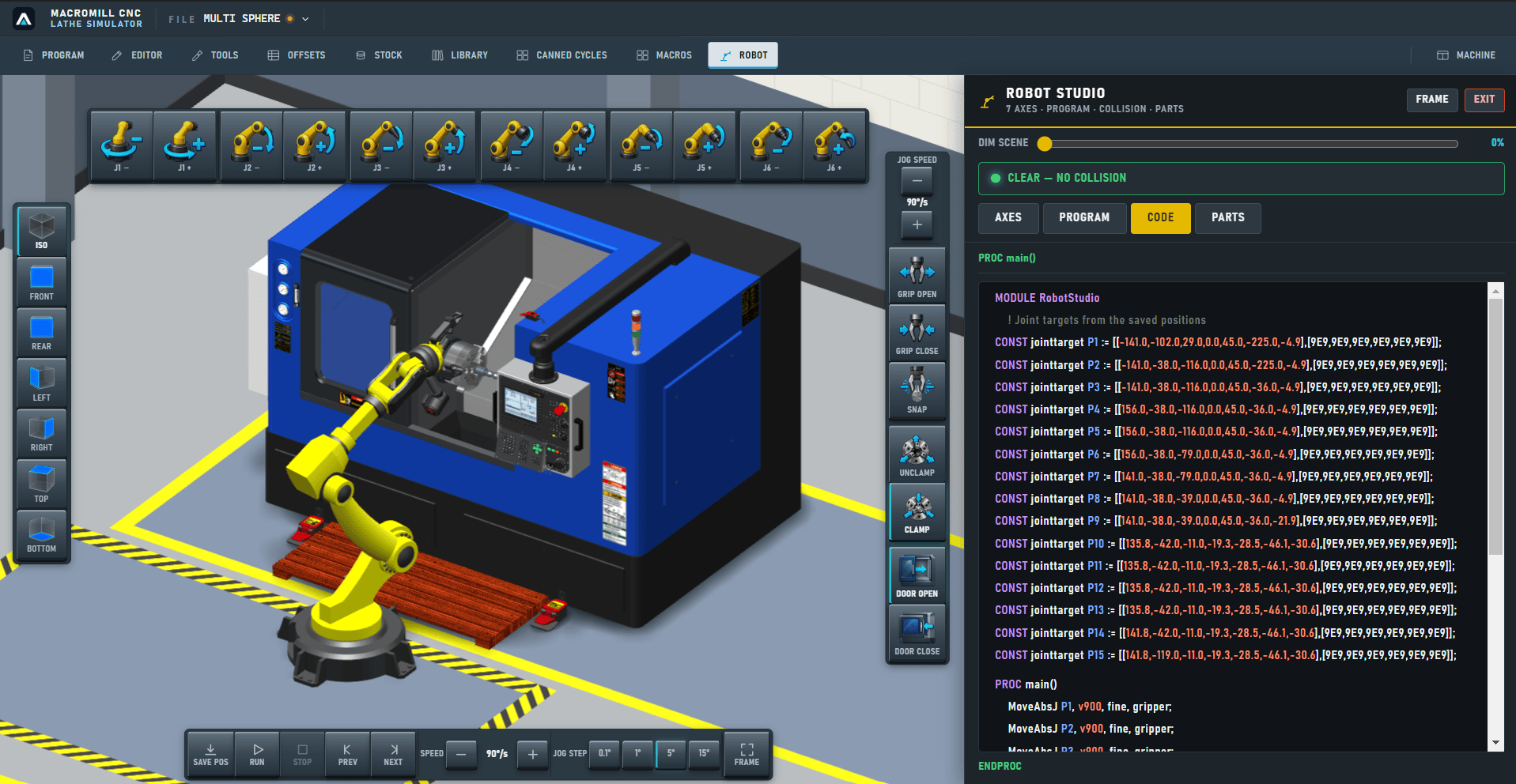
A 7-axis robot arm in a machine-tending cell, covering pick, load, clamp, door, unload and full batch production.
Practise on the simulator, not on a real machine, tool or workpiece.
Practical CNC lathe training software for the shop floor and the classroom, and a useful tool for production preparation.
CNC machinists and operators
Run and understand real programs, including macro programs, before they reach the machine.
CNC programmers
Test G-code, macro logic and canned cycles, and check programs and cycle times before they reach the shop floor.
Apprentices and students
Learn CNC lathe programming and real setup skills without risking a machine, tool or workpiece.
Training centres and colleges
CNC lathe training software for classrooms teaching programming, setup and automation.
Workshops
Prepare programs and setups for production, and explore robot machine tending.
Anyone learning robot operation
The integrated cell helps teach the basics of operating robot arms in a machine-tending setup.
Inside the simulator.
Program window, controller, tooling, analysis and the robot cell, all in one detailed 3D turning environment.
Pay once. Keep it for life.
- Windows desktop application for Windows 10 and 11, downloaded and activated on your own PC.
- Lifetime licence key, delivered instantly after purchase. One-time payment, no subscription.
- Free import packages included: extra content to import and use inside the simulator.
- High and low graphics modes, so it runs smoothly on laptops and workstations alike.
- Built-in macros and probing macros, ready to run, plus a library of more than 180 tools.
Runs on Windows.
The simulator is a training and preparation tool. Always verify every program on your real machine before production use.
Frequently asked questions
What makes this CNC lathe simulator different?
It is a full G-code and advanced macro logic executor, not just a toolpath viewer. Alongside standard G-code and canned cycles G70–G73, it runs Fanuc-style macro programs with # variables, calculations, conditions, loops and macro calls. It adds 3D simulation, live controller readouts, stock and chuck pressure analysis, more than 180 tools, a tool measuring probe and a robot loading cell.
How does the licence work?
You buy a one-time lifetime licence through Payhip, with no subscription. After purchase you download the Windows software and activate it with your licence key. Free import packages are included.
Can I get a refund?
Because this is digital software delivered instantly, all sales are final. If you are charged twice or never receive your licence, contact info@macromillcnc.online and we will sort it out. See our Refund Policy for details.
Can I run programs from the simulator straight on my machine?
The simulator is a training and preparation tool. Always review and verify every program on your real machine, with the correct tooling, offsets, workholding, machine limits and controller syntax, under the supervision of a qualified machinist before production use.
Does it run on Mac or Linux?
No. MacroMill CNC Lathe Simulator is a Windows desktop application for Windows 10 and Windows 11.
Verified customer feedback
What MacroMill CNC customers say
- 800+ verified Payhip orders
- 50K+ followers across YouTube, Facebook, Instagram, TikTok & LinkedIn
- 9 CNC controller families covered
★★★★★
“Just Amazing Software”
★★★★★
“Este curso me ha ayudado a mejorar mis habilidades en macro programación básica. Estoy muy conforme con el curso.”“This course has helped me improve my basic macro programming skills. I’m very happy with the course.”
★★★★★
“EASY TO ACCESS”
“Great programming and explanation, I will look forward to buy a few programs from you, thank you!”
Stop guessing. Start simulating.
Full G-code, advanced macro logic, canned cycles, tool probing and robot machine tending in one CNC lathe simulator. One-time lifetime licence, free import packages included.
$59.99 November launch price · one-time · lifetime licence